The easiest way to install is to use Moodle and Moodle.org’s automated install feature. However there are times when this is not an option, and in these cases you can download the plugin zip files locally and then upload them into the installation interface.
1. Download the plugin files
Download the PoodLL Filter and each of the PoodLL plugins that you wish the install.
e.g
Cloud Poodll Assignment Submission
https://moodle.org/plugins/assignsubmission_cloudpoodll
or directly from
https://github.com/justinhunt/moodle-assignsubmission_cloudpoodll/archive/master.zip
Cloud Poodll Recording Question Type
directly from
https://github.com/justinhunt/moodle-qtype_cloudpoodll/archive/master.zip
2. Go to your site’s plugins installer and install them
Your Moodle site has a handy system for installing plugins from zip files. From the site administration menu, go to:
plugins -> install plugins

Begin the Installation of each of the plugins, by uploading the zip file into the file area displayed.
Moodle should detect the plugin type automatically.
Set the API user and secret
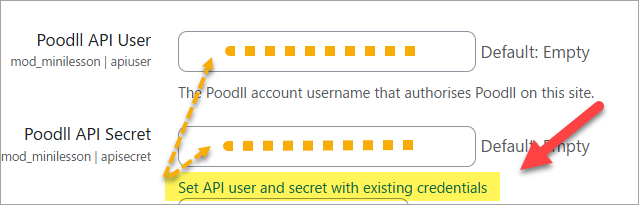
Let Moodle lead you through the installation. You can leave most of the settings as their defaults. But you must enter your Cloud Poodll API user and secret.

After you have installed one Poodll plugin and set up the Poodll API user and secret, there will be a link below API secret on the other plugins to automaticallu fill in the API user and secret fields.